


Accountable2You
4.0120.00 Reviews
App Specs
- Version
- 1.232-googleplay
- Updated On
- License
- Free
- Downloads
- 50,000+
- Developer
- Accountable2You, LLC
- Categories
- Lifestyle
- Platform
- Android
Screenshots
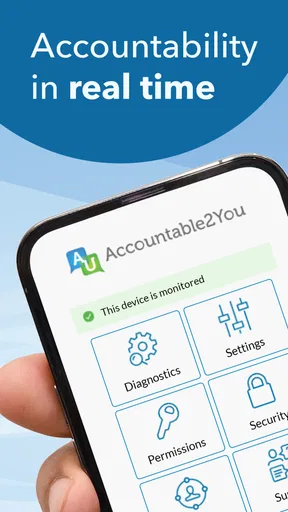
 Analysis by AppCompare
I first looked at Accountable2You as a household tool rather than just another lifestyle app. Its central idea is simple: make device use easier to discuss openly by adding accountability around digital activity. That makes it especially interesting for couples, families, roommates, or anyone sharing a wider trust arrangement, although it is not a magic solution for difficult conversations. In my experience, the value depends as much on the agreement between people as it does on the app itself.
The app is free to install, carries an Everyone age rating, and comes from Accountable2You, LLC. It has built a modest but established presence on Android, with over 50K installs and a 4.0 average from around 278 ratings. Those figures suggest that it is not an obscure experiment, but it also does not have the huge user base of a general-purpose screen-time or parental-control product. I would approach it as a focused accountability service, not as a complete household management system.
How Accountable2You fits into shared device life
When I think about Accountable2You in a home with shared devices, I start with a practical question: whose activity belongs to whom? A tablet passed between family members can blur that line, so I’d agree on device boundaries before anyone treats its information as a personal record. That distinction also leads to the next question: how can a household make shared use feel fair rather than confusing?
A realistic household scenario
Imagine a parent and an older teenager who both want clearer boundaries around phone use, but do not want every conversation to become an argument about suspicion. Or consider two adults who have agreed to support one another in staying away from certain online habits. In either case, the app can serve as a standing reminder that digital activity is part of an agreed relationship, rather than something discussed only after a problem appears.
The important distinction is that this is not the same as handing a child a locked-down tablet. A shared accountability arrangement works best when everyone understands what it is for, who is involved, and what happens when something needs to be discussed. If one person installs it secretly or presents it as a punishment, the technical setup may be correct while the relationship around it is already damaged.
I found that the most sensible household use is to establish the arrangement before relying on the app. Decide whether the goal is encouragement, recovery support, family trust, or simply more openness about online behavior. That decision affects how often people should talk, how much detail is appropriate, and whether the app is even the right fit. Accountable2You can support an existing agreement, but it cannot create mutual consent by itself.
Separate people before sharing responsibility
Shared devices create a practical problem that is easy to overlook: one phone or tablet may be used by several people, while accountability usually belongs to one person. I would avoid treating a household device as if every activity automatically belongs to the same account holder. Before setup, decide whose activity is being covered and whether other users need a separate arrangement or should avoid using that device for private tasks.
Worth Reading Before You Choose

EA SPORTS FC Mobile 26 Is a Bigger Football Game, but It Takes Time

Flipboard Shows What News Apps Must Do Beyond the Feed

Switching to Android Auto Means Rethinking Your Driving Routine

Google Calendar Makes a Crowded Week Easier to Manage

Ludo King Makes the Most of the Minutes Between Plans

Baby Panda World Brings Quick Play to Modern Phones, but Its Game Library Feels Busy
This matters in a family with a common tablet, a couple sharing a computer, or a home where guests regularly borrow a phone. Blending everyone together can produce confusing conversations and unfair conclusions. A better workflow is to keep personal devices and personal accounts clearly separated whenever possible. If shared use cannot be avoided, agree in advance on how each person will identify their use and how ambiguous activity will be handled.
The strongest boundary is a human one: nobody should assume that installing an accountability app gives them unlimited authority over another person’s private life. The app may be part of a transparent agreement, but the agreement should define expectations in plain language. I would write down the purpose, the people involved, and the process for raising a concern. That small step prevents the tool from becoming a vague source of anxiety.
Coordination is where the app earns its place
Accountability tools can easily become passive. Someone installs one, checks it intensely for a few days, and then stops paying attention. I think Accountable2You is more useful when the household creates a predictable rhythm around it. That might mean a short weekly check-in, a private conversation when something needs clarification, or a simple agreement that reports are discussed without immediate accusations.
For a couple, a calm check-in may work better than constant monitoring. For a parent and a mature teenager, the conversation could focus on whether the agreed boundaries are helping rather than on interrogating every event. For a support partnership, the app may be one piece of a broader plan that includes honest updates and practical alternatives when someone is struggling.
One useful habit is to distinguish an alert or concern from a conclusion. Digital activity can be misunderstood, especially on shared equipment or when other people are present. Treating every unexpected item as proof of wrongdoing makes the system brittle. I would use the app to decide what deserves a conversation, not to skip the conversation.
Another helpful approach is to agree on response times. If one person is expected to react immediately to every notification, the arrangement can become exhausting. A household may be better served by checking at set times unless there is a genuine urgent concern. That keeps accountability visible without turning the phone into a permanent source of interruption.
Age ratings do not define maturity
The Everyone rating is useful when considering basic access, but it should not be confused with a recommendation for every age or every family situation. A younger child may not understand the difference between support and surveillance. An older teenager may understand it perfectly and still reject the arrangement if the boundaries feel one-sided. Adults also need the same respect for consent and context.
I would be particularly careful with households where one person has much less power than another. A child cannot negotiate on equal terms with a parent, and an employee or dependent adult may not feel free to say no. In those cases, the app should be introduced with extra care, with clear explanations of its purpose and limits. If the arrangement is mainly about control rather than shared responsibility, another approach may be healthier.
For families, the best result usually comes from matching the level of accountability to the person’s age and independence. Younger users may need direct teaching about online choices, while older users may respond better to privacy-respecting agreements and regular review. Accountable2You should not be treated as a substitute for digital literacy, supervision, or a supportive conversation about why boundaries exist.
What setup feels like in practice
The Android release I reviewed is version 1.232-googleplay and supports devices running Android 7.0 or later. That gives it a reasonably broad reach for people using older Android hardware, although households with a mixture of Android and iOS devices should think through how each person will participate before committing to one shared routine.
Because the app is free to download but also offers in-app purchases priced at $14.99 per item, I would not assume that every useful part of the service is included at no cost. A sensible first step is to install it on the intended device, read the setup screens carefully, and confirm what the household actually needs before anyone agrees to a paid item. This is especially important when a parent or partner is managing the arrangement for someone else.
I also recommend choosing the primary device deliberately. If someone uses several phones, tablets, or computers, covering only one of them may create an incomplete picture. On the other hand, trying to include every device immediately can make setup feel overwhelming. Start with the device that matters most to the agreed goal, then expand only if the arrangement remains understandable and fair.
Keep account boundaries equally clear. Each person should know which account belongs to them, who is expected to receive information, and how a device change will be handled. Do not rely on a shared household login simply because it seems convenient. Shared credentials make it harder to tell who is responsible and can turn an accountability arrangement into a source of accidental exposure.
Where it differs from ordinary alternatives
Many people first think of screen-time dashboards, website blockers, or parental-control apps when they want healthier device habits. Those products are often built around limits: block an app, set a schedule, restrict a category, or enforce a bedtime. Accountable2You feels aimed at a different problem. Its emphasis is accountability and openness, so it is more suitable when the people involved want to participate in a relationship of trust rather than simply impose technical restrictions.
That difference is also its main limitation. A blocker may stop access automatically; an accountability arrangement usually depends on people noticing information and responding wisely. If your priority is preventing a young child from opening unsuitable material, a dedicated parental-control product may be more appropriate. If your priority is reducing distractions during study, a focused screen-time tool may be simpler. I would choose this app when discussion and personal responsibility are central, not when automatic enforcement is the only thing that will work.
It can also fit alongside other tools rather than replacing them. A household might use a device’s built-in screen controls for bedtime while using Accountable2You for a broader support agreement. The trade-off is complexity: every extra tool creates another account, another set of expectations, and another place where people may misunderstand what is being monitored. Keep the arrangement small enough that everyone can explain it.
Privacy, trust, and the limits of visibility
The word “accountability” can sound reassuring to one person and intrusive to another. Before installing the app for someone else, I would discuss exactly what information is expected to be shared and who will see it. Do not promise a level of privacy or visibility that the app’s current screens do not clearly explain. Instead, make the relationship’s boundaries explicit and revisit them if circumstances change.
This is particularly important when a device is used for sensitive matters such as health, finances, work, or private conversations. A household should decide how to handle legitimate personal activity before it becomes a point of conflict. If the arrangement leaves no room for ordinary privacy, the app may create more stress than support.
One practical tip is to schedule a review after the first period of use. Ask whether the arrangement is helping, whether the notifications or discussions are manageable, and whether the original purpose still makes sense. A system that was appropriate during a crisis may become unnecessary later. Continuing forever simply because it was installed can turn a temporary support tool into a permanent source of tension.
Who will appreciate it most
I think Accountable2You is best for people who already have a reason to practice openness and are willing to talk when something looks unclear. It may suit a couple working toward a shared goal, a family supporting an older child, or accountability partners who want a digital component in their routine. The free entry point makes it relatively easy to explore before deciding whether any in-app purchase is worthwhile.
It is less suitable for someone who wants a completely invisible monitoring solution, a strict child-lock system, or a one-click fix for compulsive behavior. It is also a poor match for households where nobody agrees on the purpose. Installing it during an argument is likely to make the technology part of the conflict. In that situation, a conversation, professional support, or a simpler device boundary may be the better first step.
People who dislike reviewing reports or following up on concerns may also find it frustrating. Accountability only has meaning when someone is prepared to respond. If the app produces information but the household never discusses it, the installation becomes mostly symbolic. That is not necessarily harmful, but it may not justify adding another tool to daily device use.
My household verdict
After considering it in a shared-use setting, I see Accountable2You as a relationship tool with technical support, not as a replacement for parenting, partnership, or personal judgment. Its strongest quality is the way it can give an existing agreement a regular digital structure. Its weakest point is the same: without a fair agreement, the structure can feel like surveillance.
I would recommend trying it when everyone involved understands the purpose, the account boundaries are clear, and the household has a plan for calm follow-up. Start with one important device, avoid mixing users, and review the arrangement instead of letting it run without reflection. Those steps make the experience more useful and reduce the chance of confusing ordinary device activity with a serious concern.
The app’s 4.0 average and growing install base make it worth considering, while the Everyone rating and Android 7.0 compatibility keep the entry requirements approachable. Still, the right choice depends on the problem you are trying to solve. For automatic restrictions, choose a control-focused alternative. For a transparent support arrangement built around conversation, Accountable2You is a thoughtful option, provided the people using it remain more important than the reports it produces.
Pros
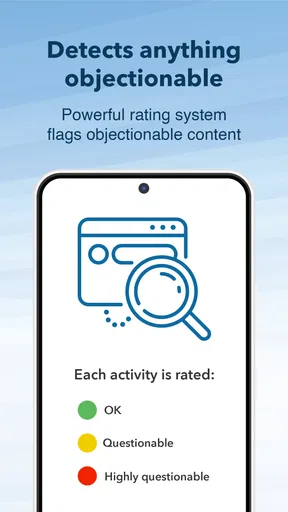
- Detailed activity reports help identify risky browsing habits.
- Works across multiple devices for consistent accountability.
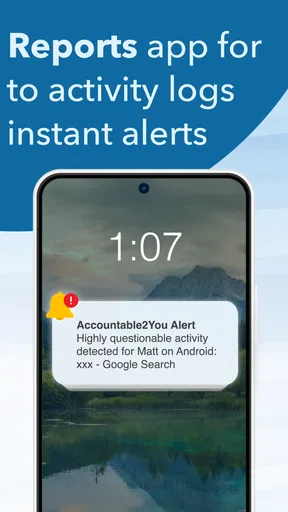
- Tamper alerts can notify accountability partners of attempted workarounds.
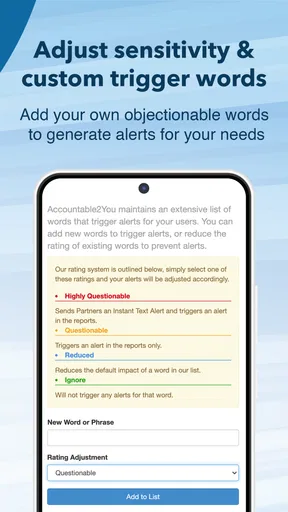
- Supports customizable monitoring rules for different users.
- Useful for families
- couples
- and individuals pursuing digital discipline.
Cons
- Some monitoring features require a paid subscription.
- Reports may feel intrusive for users who value strong privacy.
- Setup can take time when configuring several devices and accounts.
- Internet access is needed for timely syncing and notifications.
- Strict filtering may occasionally block legitimate websites or content.
FAQs for Accountable2You
What is Accountable2You and how does it work?
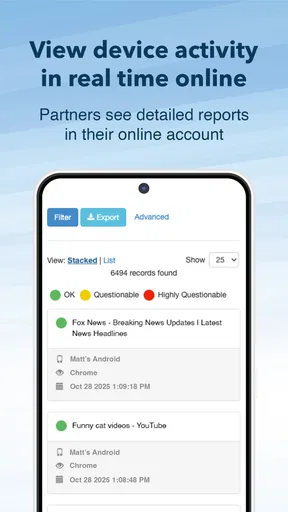
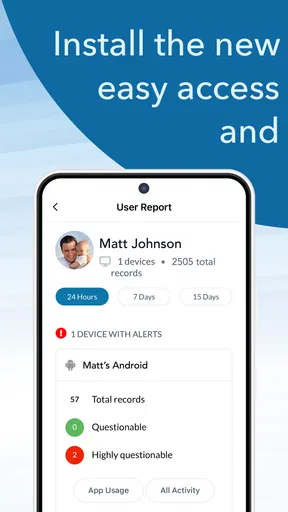
Accountable2You is an accountability and monitoring app designed to help users manage online habits and reduce access to inappropriate or distracting content. After installation, it monitors activity on supported devices and generates reports that can be shared with a trusted accountability partner. The service is intended to encourage transparency and responsible digital behavior rather than act as a complete replacement for personal supervision.
Which devices and platforms are supported by Accountable2You?
Accountable2You supports several common platforms, including Android, iPhone, iPad, Windows, macOS, and Chromebook, although available features can differ depending on the operating system. Before downloading, users should check the current compatibility information because monitoring capabilities, browser coverage, and reporting options may change with system updates or device restrictions. Some features may also require separate setup on each device.
Does Accountable2You block websites and applications automatically?
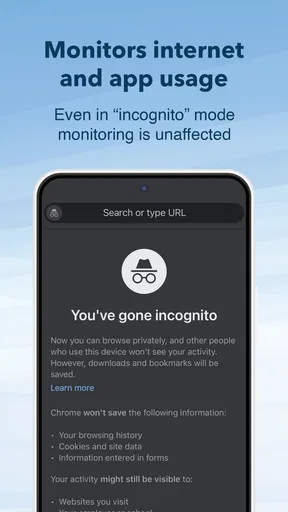
Accountable2You primarily focuses on monitoring, activity reporting, and accountability, but certain filtering or blocking functions may be available depending on the device and subscription configuration. It should not be treated as an infallible content filter, since technical limitations, private browsing modes, unsupported applications, and operating-system restrictions can affect results. Users should combine the app with device controls, clear boundaries, and trusted supervision.
Will another person be able to see everything I do on my device?
The app is built around transparency with an accountability partner, so selected activity information may appear in reports shared with that person. The exact level of detail depends on the platform, settings, and account configuration. Before using it, review the privacy policy and discuss expectations with the person receiving reports. Anyone installing the app should understand what data is collected, how it is used, and who can access it.
Is Accountable2You free to use, and is it difficult to set up?
Accountable2You generally operates through a subscription model, and availability of trials, plans, or promotional pricing can vary over time. Setup is usually straightforward: create an account, install the appropriate app or software on each device, choose an accountability partner, and grant the permissions required for monitoring. The process may take longer on systems with stricter privacy controls, so users should follow the setup instructions carefully.


